Banpei.net

Remembering Japanese cars from the past

Page 242 of 318

Genuine Dutch Datsun 240K GT catalogue

Oops I did it again…
Datsun 240K GT GC110

Yes: I bought another car folder… And this time I found the Dutch Datsun 240K GT and could not resist myself from buying it…

Datsun 240K GT GC110

In contrast with the sober looks of the Dutch Nissan 2400GT this folder really goes wild with the styling! Beautiful 70s girls dressed up in fashionable 70s style. Somehow it really fits the GC110 well!

Datsun 240K GT GC110

While the Nissan 2400GT was marketed as a performance car the 240K GT was clearly marketed as a stylish sports car.

Datsun 240K GT GC110

Lucky enough this time Nissan allowed the export models of the Skyline to retain famous the round taillights!

Datsun 240K GT GC110

And the car still has the same 2.4 liter L24 engine.

Scans will follow soon! (I hope)

Hilarious: Nomuken shows his other driving skills!

You all knew Ken Nomura was able to drift himself to a third place in the D1GP this year, but what you didn’t know was that he has a much wider range of driving skills!

So what else can he do then? Well, parallel drift parking (30 cm space at each side of the car), popping a balloon while driving reverse, sharpen a pencil while driving reverse and last but not least: light a match while driving reverse! :D :D

Too bad he only uses his ER32 for the parallel drift parking… I really would loved to see him do the pencil sharpening with his ER34! ;)

Random: All Nissan Bluebird generations

I came across this image somewhere on images.google.com and really liked it. Nothing special or fancy about the picture, but I really liked to see all generations (and SSS models) in one single picture:
All generations of the Nissan Bluebird

I have no idea why the seventh generation is actually on top… Maybe the personal preference of the person who created the picture?

Now, maybe I should try to create one with all zokusha Bluebirds? :P

Found here:
The Bluebird Hall of Fame

Carina Sightings: MSC Inland Sea Carina AA63

I finally found some video footage of the Carina AA63 I spotted each year at the MSC Inland Sea round!!

The car is not doing bad at all but he still lacks something. He misses the apex with a meter and doesn’t really keep his angle right, so it is just that his lines are a bit too wide I guess…

From its appearance it really looks like an 80s grachan zokusha! It has got an oil cooler sticking under its front bumper, it has the wild painted colors and a big banner on the front screen!

This is the car competing in round 12 in 2006:
Toyota Carina AA63 at MSC Inland Sea

Apparently the guy is local: I’ve never seen him competing outside the Inland Sea rounds. And the nice thing is he competes in that round every year!

This is the car competing in round 8 in 2007:
Toyota Carina AA63 at MSC Inland Sea

He always enters the Expert SD class but never manages to qualify for the best 12…

This is the car competing in round 4 in 2008:
Toyota Carina AA63 at MSC Inland Sea

Unfortunately there is still no complete photo page of round 11 of 2009, so we will have to wait for the 2009 photo a bit longer I guess…

Minkara guide – Part one: register your account

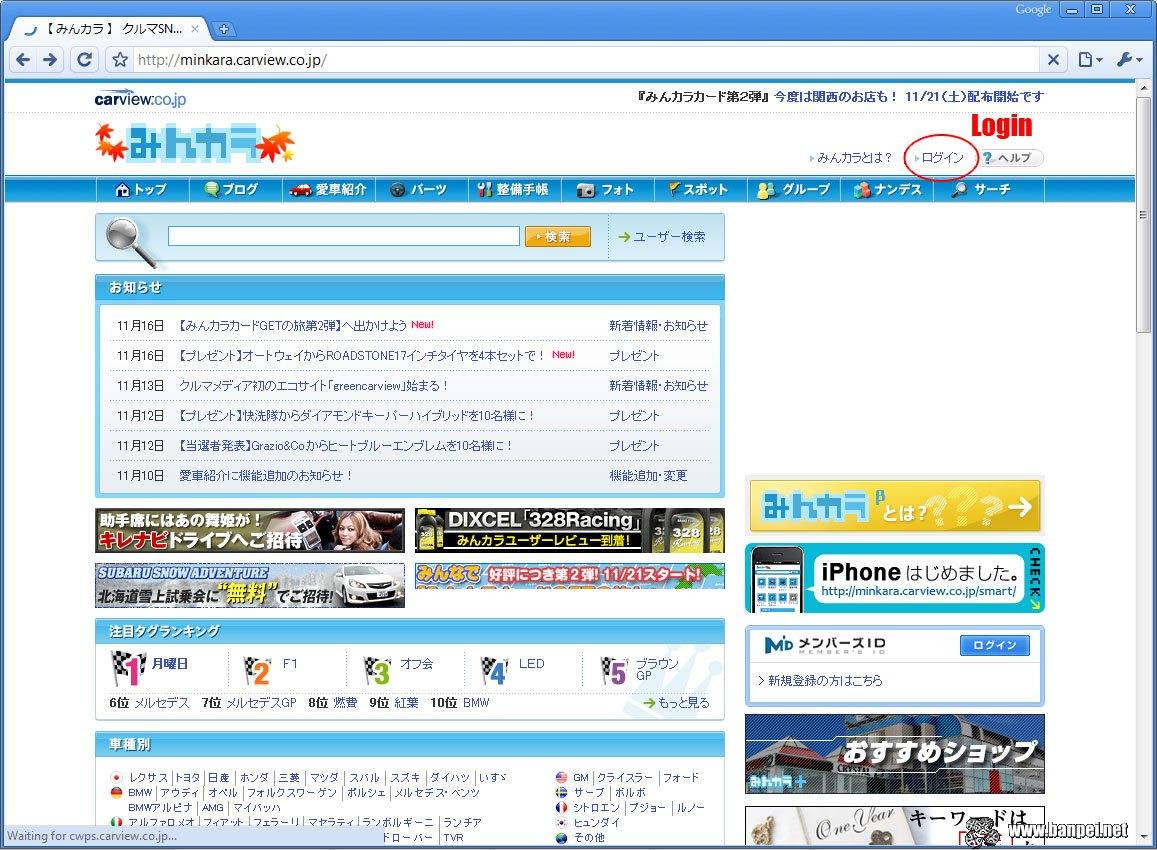
I have been walking around with this plan for a long time now. I already have a Minkara account for some time now, but it took me some effort to register and set up the account properly. The biggest problem with it is that you can’t translate the whole page automatically because Minkara uses images as buttons and sessions to keep track of on which page you are in your personal profile.

So, this is part one of the Minkara guide: registration of your own personal account!

You may wonder why you would need one… Well, there are a few reasons why:
1. You can’t place comments on minkara pages without an account
2. You can’t send emails to other minkara users without an account
3. You can become friends with your favorite minkara users
4. Profilate yourself inside Japan!

So, let’s get started with the registration then! First of all you need to find the login page to actually get to the registration page. So go to the main page of Minkara first:
Minkara main page

Minkara guide: finding the login page

So now you know where to login after your registration as well! ;)

On the login page you can also find the link to the registration page:
Minkara guide: finding the registration page

Click on it and you will go to the first step of the registration process.

Minkara guide: step 1 - fill in registration form
Minkara guide: step 1 – fill in registration form

So, fill in that form with all the information you want to provide. Input fields prefixed with an asterisk (*) are obliged to be filled in. Basically every field except the ones for the newsletters.

Please be careful: the Minkara ID is different than the Nickname! The ID is used to log in while the Nickname is the display name to other users. You can’t change the ID, but you can change your Nickname afterwards.

Also the prefecture needs to be filled in. Personally I always filled in the Gunma prefecture for obvious reasons. ;)

Now this is an example of how I filled in the AEU86 account:
Minkara guide: step 1 - example
Minkara guide: step 1 – example

So, press that Continue button and have Minkara your account credentials checked.

Minkara guide: step 2 - check your details
Minkara guide: step 2 – check your details

Check your details! If they are correct you can press the Register button. Otherwise you can press the other button to go back to step one and correct your details.

It may also happen that one of your details is wrong (ID taken for instance). It won’t continue to step two in that case and show the incorrect fields in step one marked red.

Minkara guide: step 3 - check your mail
Minkara guide: step 3 – check your mail

After you pressed the Register button Minkara will send an activation email to the email address you provided in step one. So go check your email!

Minkara guide: step 3 - open link in confirmation email
Minkara guide: step 3 – open link in confirmation email

If you did everything right you should have an email within 5 minutes. It could happen that the spamfilters of your email provider pick up the email as spam, so if you don’t receive an email within 15 minutes also check your junkmail folder. ;)

Click on the link and you will go to step four:
Minkara guide: step 4 - log in for the first time
Minkara guide: step 4 – log in for the first time

You just confirmed your email address and are now asked to log in for the first time. Put in the Minkara ID and password you provided in step one and press the Login button.

Minkara guide: registration done!

Congratulations! You just created your own Minkara account!

In part two we will describe the basics of how you can pimp your profile page and add your cars!
Commerical time: 1979 Mitsubishi Galant Sigma seats

I think Mitsubishi did an excellent comparison in this CM:

Benz, BMW, Mitsubishi Galant Sigma!

And I found another one:

Somehow during the late 70s and early 80s the Japanese had the impression that the best car seats should be as soft and fluffy as possible. I have no idea how these Galant Sigma seats actually sit, but I had the pleasure to sit in both those Benz and BMW seats in the past and they were actually very comfortable. I could not say the same about the 1990 Mitsubishi Colt seats I sat on during a 1600 kilometer vacation… My personal experience actually is that the harder the seats, the more comfortable they get on the longer distance travels.

Soft and fluffy seats? No thanks! ;)

« Older posts Newer posts »

© 2025 Banpei.net

Theme by Anders NorenUp ↑